
Plain and Simple Thoughts
Links, recipes, receipts and papers, kept where you can find them.
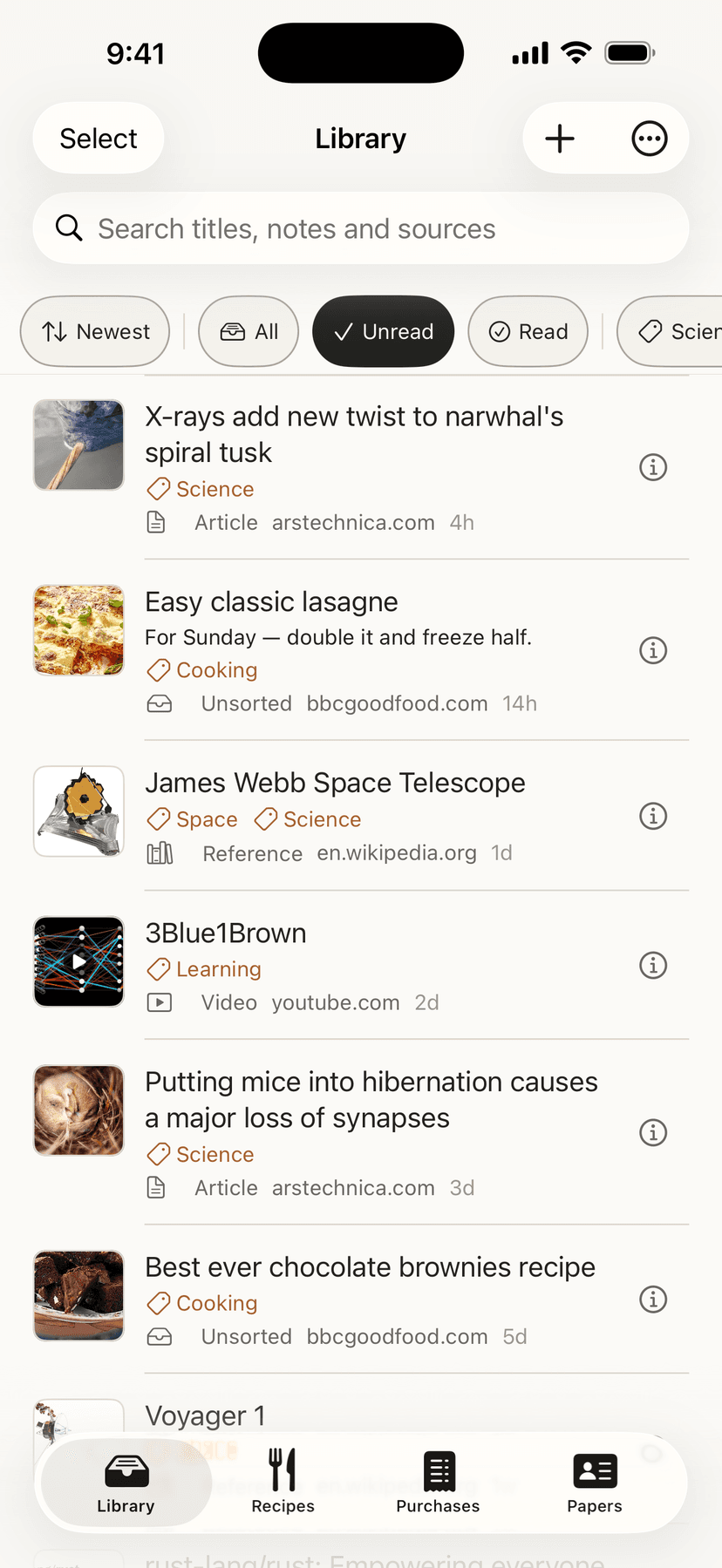
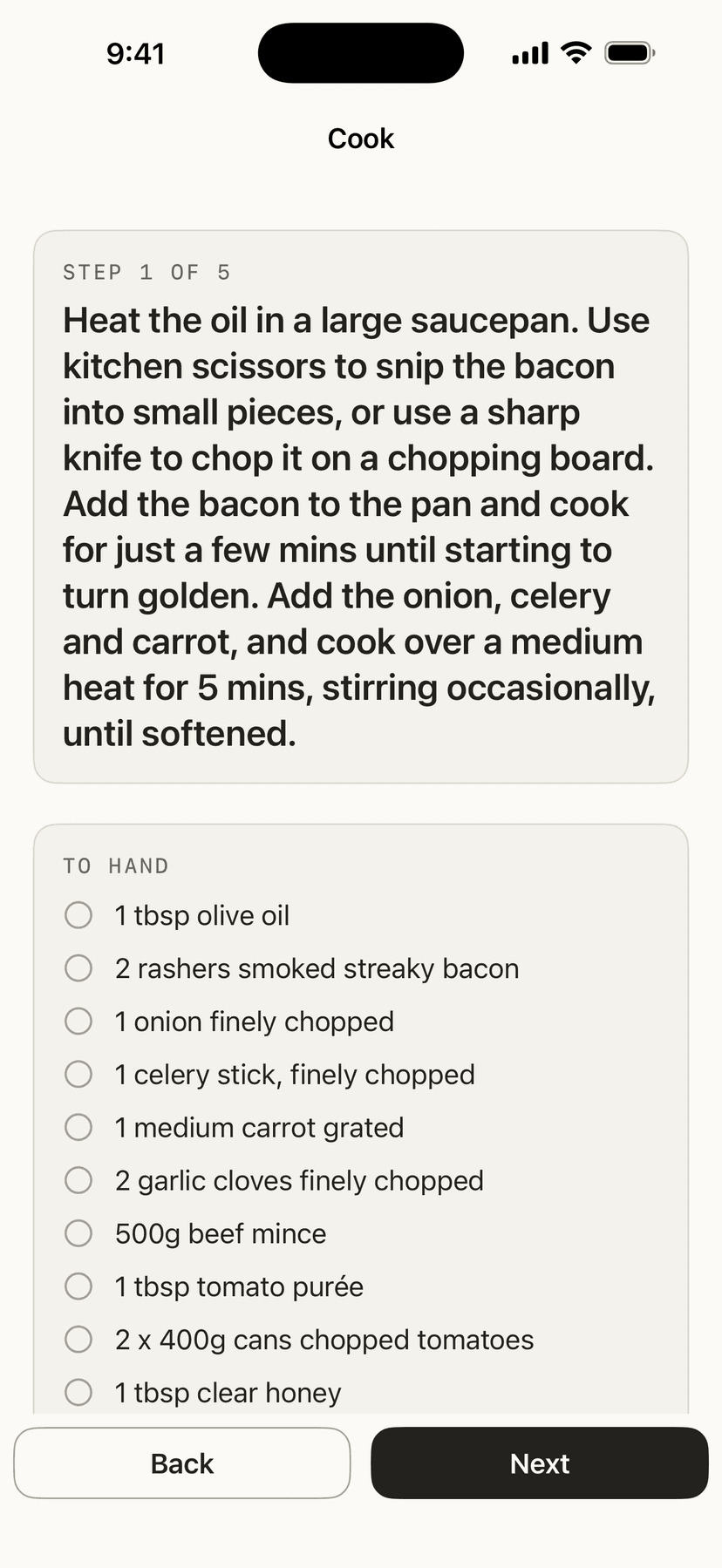
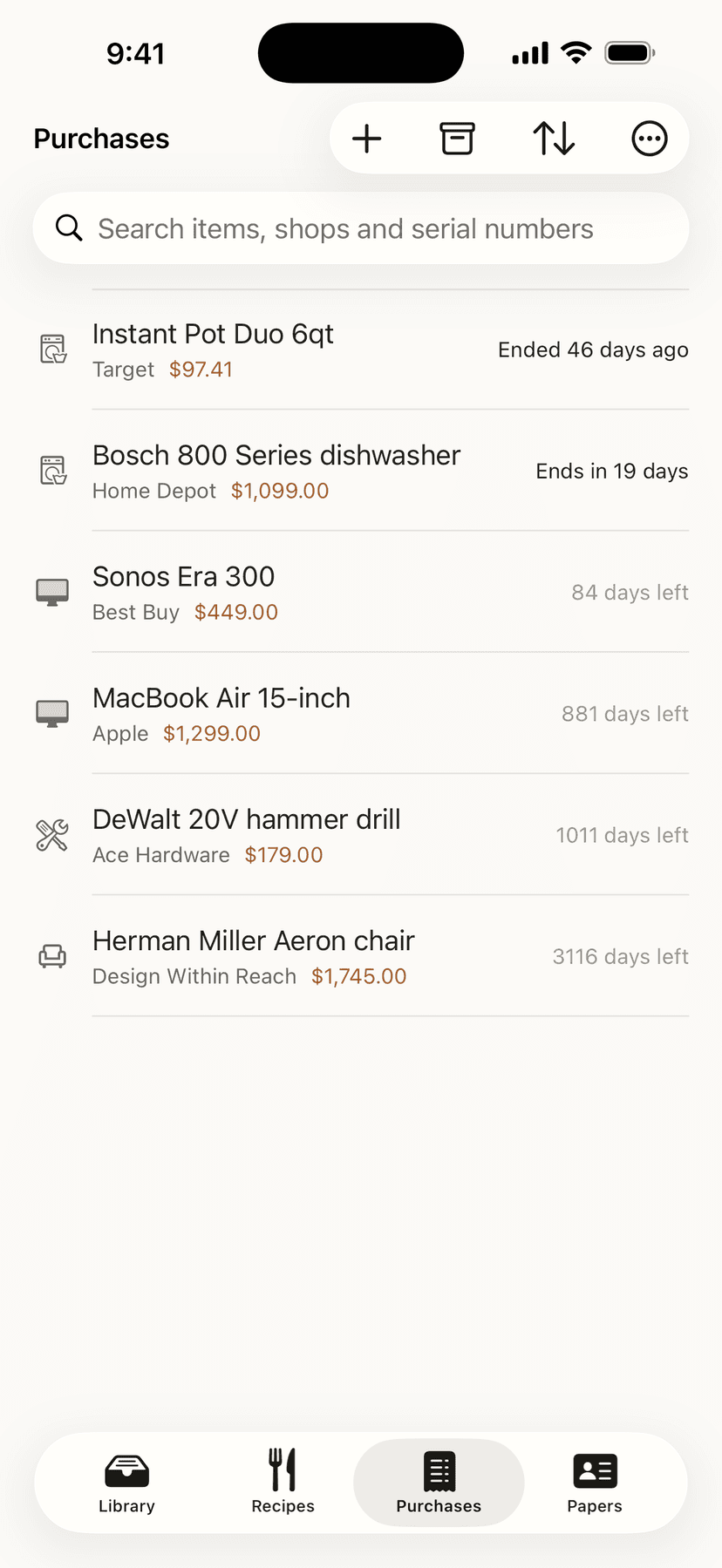
- Save a link, a recipe, a receipt or a passport from anywhere you can reach the Share button.
- It sorts what you save, reads a recipe as it arrives, and tells you before a warranty runs out.
- Syncs through your own iCloud — with no subscription standing between you and the things you saved.
Everything it does
Nothing here
no account · no server · no one in between
Nothing here
no account · no server · no one in between
Who this is for
For anyone who keeps meaning to read something later and has run out of places to put it — a pile of open tabs, a message sent to themselves, a bookmark folder nobody opens. It needs nothing but an iPhone or iPad.
It has since grown three more shelves for the other things that end up in a drawer: recipes, receipts and warranties, and papers like a passport or a licence. They are separate tabs and none of them asks anything of you — if you only ever want the reading pile, the rest can sit unused.
It will suit you if the read-it-later app you tried wanted an account, a subscription, or a look at what you save. It will not suit you if you want to share a reading list with someone else: it keeps everything in your own iCloud and nowhere else, so there is no mechanism for letting anyone in, including me.
How to set it up
- 01Install it and open it once. It explains what it does and how to switch the share button on, which iOS makes you do by hand the first time.
- 02In any app — Safari, a message, a social app — tap Share and choose PS Thoughts. That is the whole of using it. If you would rather not use the share button, there is a + on your library: paste an address straight in.
- 03Come back to the app when you want to read. Things you have not read yet are what you see first.
- 04Tap one to read it. Add a note if you want to remember why you kept it, and archive it when you are done.
- 05There are three more tabs when you want them: Recipes, Purchases for receipts and warranties, and Papers for a passport or a licence. Each stands on its own, and the ones you do not need can be ignored.
What it does
- Save a link from anywhere you can share
- It saves a link from anywhere you can tap Share, and it works whether the other app hands over a web address or a lump of text with an address buried in it.
- It sorts what you save
- It sorts what you save by what it is — an article, a video, code, a reference page, a post — and by where it came from, so a long list stays findable without you filing anything.
- It fetches the title and the picture
- It fetches the page's title and its preview picture, so a saved link reads as the thing it is rather than as a web address. The title comes from the site you saved; the picture may come from the image server that site uses. Nothing goes to me.
- Recipes, read as you save them
- Share a recipe page from your browser and it reads the recipe as you save it — ingredients and method, already laid out. That is not guesswork: recipe sites publish their recipes as structured data, so it is reading the recipe rather than interpreting the page. It makes no extra request to do it, which is why it still works behind a login, behind a paywall, or with no signal at all.
- Four ways to get a recipe in
- Share a recipe page from your browser, paste its address into the app, write one out yourself, or share a photograph of a cookbook page and let the phone read the words off it. A recipe you typed or photographed is yours: it syncs to your other devices and survives a new phone.
- Nothing read off a photo is saved until you have checked it
- A camera misreads, so a photographed recipe is shown to you as a form filled in with what it found, and nothing is kept until you press Save. The reading happens on your iPhone — the picture is not sent anywhere, and neither are the words.
- A screen for your recipes
- Your recipes have a screen of their own, and you can search them by what is in them — type an ingredient and get the recipes that use it. Amounts can be doubled, halved or switched to metric, and there is a cooking mode that shows one step at a time, keeps the screen on, and remembers which step you were on if you leave and come back.
- Add a photograph of your own
- A receipt, a paper or a saved link can carry a photograph you took — scanned with the camera, chosen from your photos, or lifted out of a PDF. It is yours, so it goes to your iCloud with the record it belongs to, and it is on your iPad too.
- Two ways in, so the share button is never the only one
- There is a + on your library: paste a web address and it is saved exactly as if you had shared it. That matters because iOS hides a share button until you switch it on by hand, and until there was a + there was no way into the app for anyone who had not.
- Receipts and warranties, with the date that matters
- Keep a receipt with what it cost, where it came from and when the warranty runs out. Photograph it and your iPhone reads the shop, the total and the serial number off the picture and shows them next to what is already in the form, so you check each one before choosing to use it.
- Papers, and a lock if you want one
- A passport, a driving licence, an insurance card — the number, the expiry, and a picture of it. The Papers tab can be locked behind Face ID or your passcode. That is off until you turn it on, and until you do, the app says plainly that a licence number in there is no better guarded than a note.
- A reminder before something expires
- A warranty or a passport can carry a reminder, which arrives from your own phone a few days before the date. It is off unless you set one, there is no reminder you did not ask for, and nothing is sent to a server to make it happen — your iPhone schedules it and your iPhone delivers it.
- A number on your Home Screen or Lock Screen
- A paper you pin gets a widget: the number you need, readable on the Lock Screen without unlocking the phone — for the moment at a desk or a gate when digging it out of an app is the slow way round. Turn the Papers lock on and the widget goes blank instead, because a lock that leaves the number on the Lock Screen is not a lock.
- Found from your Home Screen
- What you saved turns up in the search you pull down on your Home Screen, so you can get to a link without opening the app first. The index is built on your device out of what you already have, and it is never handed to Apple's own search — the kind of indexing that would let an item show up in somebody else's results is deliberately not used. Archive something and it leaves the search too.
- Put two saved things side by side
- Pick two recipes or two saved links and see what is the same, what is different, and what is only in one. It happens on the phone, and neither one is read by an AI.
- Take something back out as a file
- A saved link, recipe or paper can leave the app as a PDF you can read or print, plain text in Markdown for your notes app, or the original photo, through the share sheet or into Files. Nothing is uploaded to do it.
- Read it aloud
- Open a saved link and tap Play, and the phone speaks the page in a voice already on it, with speed and skip-by-paragraph on the screen and the Lock Screen keeping up. The page is fetched only when you ask, from its own site.
- Papers you can search by what is written on them
- Searching Papers also finds a paper by the words on its photograph. The words are read on your iPhone, kept on that device only, and never sent anywhere.
- The share sheet asks where it goes
- When you share a link or a picture to the app, it asks where it should go, and remembers your last choice.
- Search a receipt by its serial number
- Receipts and papers can be searched the way you would actually look for them — the shop, the item, the serial number on the back of the box, the number on the document. They can be sorted by what runs out soonest or by what you added last, and the order you chose is still there the next morning.
- Deal with several at once
- Pick several saved links and archive them or mark them read in one go, with the number you are about to act on shown before you do it. There is no bulk delete, on purpose: archiving can be undone and deleting cannot, and a permanent action does not belong behind a multi-select.
- A real iPad layout
- On an iPad it lays itself out as an iPad app — a sidebar and a proper tab bar — rather than a phone screen stretched wide.
- Attach one link to another
- It can attach one link to another, so a reply or a second article about the same story sits with the thing it belongs to instead of starting a new row.
- Compare what your sources say
- It can compare a set of things you saved and show you where your sources agree and where they contradict each other. It is off until you turn it on, it can run entirely on the phone, and it reports what your sources say rather than ruling on what is true.
- Tracking parameters stripped off
- It strips the tracking parameters off a link before it stores it, so what you keep is the page rather than a record of where you found it.
- Syncs through your own iCloud
- Your library syncs through your own iCloud, so a link saved on the phone is on the iPad. There is no account, no server of mine, and nothing to sign into.
- Nothing to buy, and nothing sold
- No adverts, nothing to buy, no subscription, no analytics, and no reading history sold to anyone. What you save is yours.