
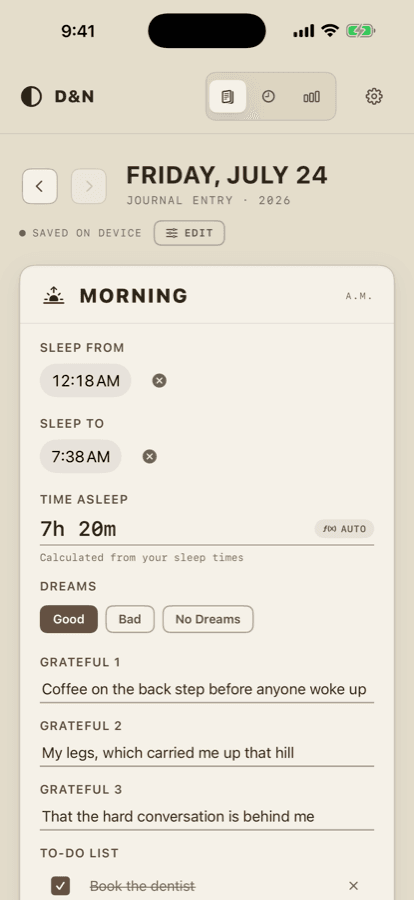
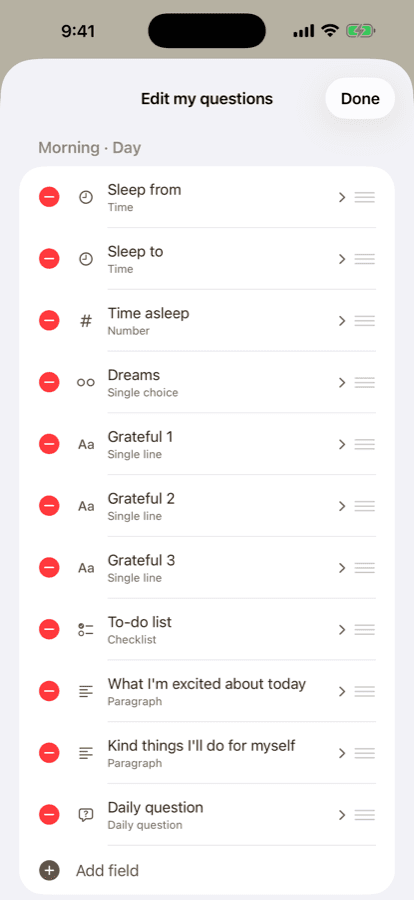
- Two pages a day — a morning column and an evening one — asking the questions you chose, not the ones an app picked for you.
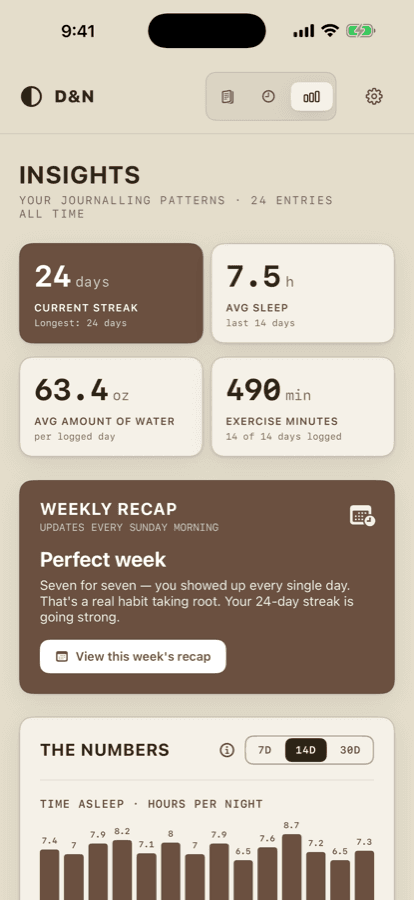
- Widgets on the Home Screen and the Lock Screen, a writing streak, and charts that find your patterns without you keeping a spreadsheet.
- Syncs through your own iCloud, and comes back out as a CSV, a printable book, or a backup you put a password on.
Where your data goesYour own iCloud
Everything it does
youriPhone
Nothing here
no account · no server · no one in between
youriCloud
youriPhone
Nothing here
no account · no server · no one in between
youriCloud
Who this is for
For anyone who wants to think twice a day — once in the morning, once at night — and keep it entirely to themselves. It needs nothing but an iPhone or iPad.
It will suit you if you have bounced off journalling apps that wanted an account with them, a subscription, or a look at what you wrote. It will not suit you if you want a journal you can share: it syncs through your own iCloud and nowhere else, so there is no mechanism for letting anyone else in, including me.
How to set it up
- 01Download it from the App Store and open it. There is nothing to buy. The only sign-in is Sign in with Apple, which unlocks the app rather than opening an account with me.
- 02Answer the prompts it comes with, or open Edit and replace them with the questions you actually want to think about.
- 03Optionally, allow it to read sleep, steps, exercise minutes, and heart rate variability from Apple Health, so you are not retyping what your devices already recorded. The only thing it writes back is a stopwatch run you choose to save as a workout.
- 04Sign in to iCloud on your other Apple devices and the journal follows you there. There is nothing else to configure.
What it does
- Every prompt is yours
- Add, rename, reorder, retype or remove any field, so the questions are the ones you actually want to think about. Removing a prompt never erases your history: past days keep the prompts they were written with, and you can bring a removed prompt back — it tells you how many answers it is still holding.
- A morning column and an evening one
- Intentions, gratitude and to-dos in the morning; meals, movement, mood and thoughts at night. Those halves are the only fixed ideas in the app — everything inside them you decide, and you choose how many to start with.
- Answered however the question suits
- Short text, long text, numbers, sliders, time pickers, single- and multi-select choices, checklists, a tap-to-count tracker that is good for glasses of water, and a stopwatch. Plus a photo of the day, a question of the day that changes each morning, and recurring tasks that turn up only on the days they are due.
- Widgets on your Home Screen
- Six: today's to-do list, a counter, a goal, your writing streak, a timer, and Today's Page, which shows how many questions you have filled in for each section. The to-do list and the counter are tappable on the widget itself, without opening the app.
- The streak, a goal and the timer on the Lock Screen
- Those three come in Lock Screen sizes as well. They are read-only there — an accessory widget takes no buttons — and the timer keeps counting with the app closed, banking an overnight run against the right day.
- On iPad, and it takes handwriting
- Two columns on an iPad, one on a phone. Write into any text field with Scribble and it becomes text. With a keyboard attached, Tab moves between fields and Space checks things off.
- It reads Health so you don't retype
- Sleep, steps, exercise minutes and heart rate variability fill themselves in, if you connect it. The only thing it writes is a stopwatch run you choose to save as a workout; it is entirely optional, and the app works fully without it. It finds your real overnight session rather than counting an afternoon nap.
- Insights, On This Day, and a search worth having
- The Insights tab is a stack of cards you swipe through: your consistency and your trends over time, month against month, and On This Day, which shows what you wrote on this date in earlier years. It is worked out on your device and never sent anywhere. Search looks back through everything you answered, not just the dates, and jumps straight to the question that matched.
- Stopwatch celebrations
- A stopwatch field can chime at an interval you choose while it runs, counted from when you tap Start, from every 30 seconds up. On iOS 26 and later the chime uses the system alarm, so it rings even when your phone is on silent once you allow alarms the first time. On older iPhones it follows the mute switch. While it runs it can show on the Lock Screen as a Live Activity.
- Quick notes, if you want them
- An add-on that is off until you turn it on in Settings: a running list of things you say, not tied to a day. Say it and tap Done to keep the words; the recording is discarded and speech stays on your phone. The words sync through your own iCloud. Each note has an Add to to-do button that puts it on today's list.
- Thoughtful Entries, also optional
- Another add-on, off until you turn it on in Settings: a list of longer, one-off entries, each with the date it was written, in a full-screen editor. They are not tied to any day's questions, and they sync through your own iCloud.
- Your paper and your type
- Settings opens on Appearance. Choose Cream (the classic look), White paper, or Dark, a warm brown-black for night, and a typeface: San Francisco, New York, Rounded, Avenir Next or Georgia. The choice follows you through your own iCloud.
- A photo nudge in the evening
- The first time you open the journal in the evening, it asks once, and skippably, "A photo from today?". Nothing is added unless you pick one, and the app never reads the picture.
- Reminders that come from your own phone
- Optional morning and evening nudges, and the Weekly Recap that rounds off your week. They are the only things the app will ever send you, they are written on your device, and no push server is involved.
- Sign in with Apple is a lock, not an account
- It keeps the journal to you on a shared device, and what it leaves behind is an anonymous identifier on that device. I never receive a name, an email or a password, because there is nowhere to send one.
- Yours to take back out
- A CSV for a spreadsheet, a printable PDF book of your days, and a full backup you can put a password on. And a delete that genuinely deletes. A journal should never be trapped in an app.